WELCOME This site is for anyone interested in Olympus and OM System system cameras. First time visit? Check out our FAQ. You need to REGISTER before you can post. After registration and two posts, forum ads will disappear.
* Registered members don't see ads on the forum after two posts - sign up for free *
** We are aware that image uploading is currently not working properly and we're working on it. We're very sorry for the inconvenience and hope we can return to normal ASAP. **
A good article. Certainly a great showcase for the OM1. I'm still not convinced it'll help my photography, but I can see that for wildlife it's a big step up.
Thank you for drawing our attention to this. Notwithstanding his enthusiasm for the OM1 it will be the EM1ii which accompanies us on our planned 9th trip to the Kruger in April. At 80 I can't really justify the cost and effort of upgrading. My 80th birthday present to the long suffering family back in April this year was ten days in the Kruger. We totaled nine in three cars and had good sightings and photos. Unfortunately my Oly 100-400 played up on focus at the long end and longer distances so some photos were disappointing. Usually I have a spare long lens but the PanaLeica 100-400 was being used by my son Who's_E and the 40-150/2.8 by my daughter whilst the 300/4 languished at home as you really need zooms for this kind of work.
For those that think saving both JPEG & RAW is only for the less experienced or whatever thoughts they may have (the 'raw' snobs ), I like his comment, "I have the JPG and RAW image side by side. I view the JPG images as they load much faster." Yes, & the 'spray & pray' method becomes a necessity with wildlife too (& also in other action type photography).
Ross"I fiddle with violins (when I'm not fiddling with a camera)". My Flickr OM-1, E-M1 Mk II plus 100-400mm f5-6.3 IS, 7-14, 12-40 & 40-150 f2.8 Pro lenses, MC14 & 20.
Actually, even for landscapes, I totally disagree that the JPEG is useless
Well, there will be some scenes where it will work fine, but the DR of nearly everything I shoot means that I'd be unlikely to get what I need out of the JPEG.
It still shows what I had set the camera to & gives me a starting point & a reference when editing the raw file
Unless you go viewing the images using the OS file explorer, I can't see how this really helps. I only use LR to view images and I apply an import pre-set to render the raws in a standard way - you can choose camera profiles, or Adobe profiles.
bringing a raw file into LR or even viewing in Windows Explore, the image will not look like the camera's JPEG.
That's not true for LR. If you use an import preset, then you can render the raw using a profile that will either match the camera, or apply another to your taste.
I believe it is good practice to try to achieve an ideal JPEG output from the camera with all the appropriate settings
Why? Some of my shots look terrible SOOC - for example, here is a before and after:
It looks like this because I exposed for the highlights in the clouds - something that is essential in most landscape shots.
then it is easier to achieve the best RAW edited outcome
Define "best". The camera will be making its own interpretations on things like tone curve, sharpening, NR etc. If I shoot raw I can do all this in PP and get the look I want. There's nothing magical about the in-camera jpeg (as the various "picture modes" will attest).
I'm sorry abut the images, Paul - this happens occasionally and I still don't know why. It's probably cached in your browser as you uploaded the images in the first place.
I suspect there was a server glitch, though the logs aren't showing anything obvious.
You can email the images to me and I can repair the post?
No images, but either way, I stand by my comment, "saving JPEG & RAW" has its advantages as I quoted from Neil's blog, particularly when taking multiple images of wildlife etc., as it makes life a lot easier to check the images on any device without the requirement of any particular program or codec etc. to see it, plus using the camera's settings for the best JPEG outcome means there is less adjustment needed for the RAW file. A shame Olympus/OMDS have designed & produced cameras with the possibility of outputting creative JPEGs when only RAW files are saved (PEN-F also comes to mind). That doesn't mean I don't edit RAW files & especially in other programs, because I do (in Capture One & maybe followed by Topaz) for most of my images that I want to share, but I also like to have the 'original' JPEG for reference. Also, I don't have an 'allergy' to using OM Workspace either (although it has its limits). I actually prefer to use it for downloading (from SD cards) & for resizing images for web display etc.
On displaying JPEGs & RAWs in Windows 'Photos' viewing program, here is an example in screen shots showing the difference between how both are displayed.
Notice the RAW (ORF) file in Windows is showing with auto adjustment to lighten the shadows (I don't know why it shows smaller here though).
And my final image (screen shot as displayed in Windows Photo) after editing the RAW file in Capture One & Topaz DeNoise.
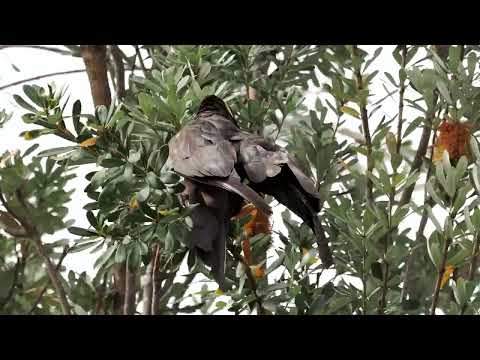
BTW the above is a very young Eastern Whipbird.
EDIT:
As an example of how many photos it can take to get something OK this is a sequence I put together (of JPEGs in OM Workspace).
Ross"I fiddle with violins (when I'm not fiddling with a camera)". My Flickr OM-1, E-M1 Mk II plus 100-400mm f5-6.3 IS, 7-14, 12-40 & 40-150 f2.8 Pro lenses, MC14 & 20.
Thank you for sharing this fascinating story, 30,000 shots in 16 days on safari in Kenya is pretty good going. I liked the quality of his wildlife photos from the sample images he chose. Clearly a competent and experienced photographer. I am flying back to Kenya at the weekend and looking forward to seeing the wildlife, bird life and everything. Can’t see I would get up to 30K shots in a shoot,
I find using 25fps with pro-capture I can get easily 4000 shots in a couple of hours down by the river (3990 of them go straight in the bin ). Over 16 days if the subject matter was interesting I expect 30K would be easy but I would need to filter import and import every day.
We process personal data about users of our site, through the use of web browser cookies and other technologies, to deliver our services, and to analyse site activity. No banner advertising is shown to members logged in to the site. For additional details, refer to our Privacy Policy.
By clicking "I AGREE" below, you agree to our Privacy Policy and our personal data processing and cookie practices as described therein. You also acknowledge that this forum may be hosted outside your country and you consent to the collection, storage, and processing of your data in the country where this forum is hosted.

 Tweet
Tweet


 ), I like his comment, "I have the JPG and RAW image side by side. I view the JPG images as they load much faster."
  Yes, & the 'spray & pray' method becomes a necessity with wildlife too (& also in other action type photography).




Comment