WELCOME This site is for anyone interested in Olympus and OM System system cameras. First time visit? Check out our FAQ. You need to REGISTER before you can post. After registration and two posts, forum ads will disappear.
* Registered members don't see ads on the forum after two posts - sign up for free *
** We are aware that image uploading is currently not working properly and we're working on it. We're very sorry for the inconvenience and hope we can return to normal ASAP. **
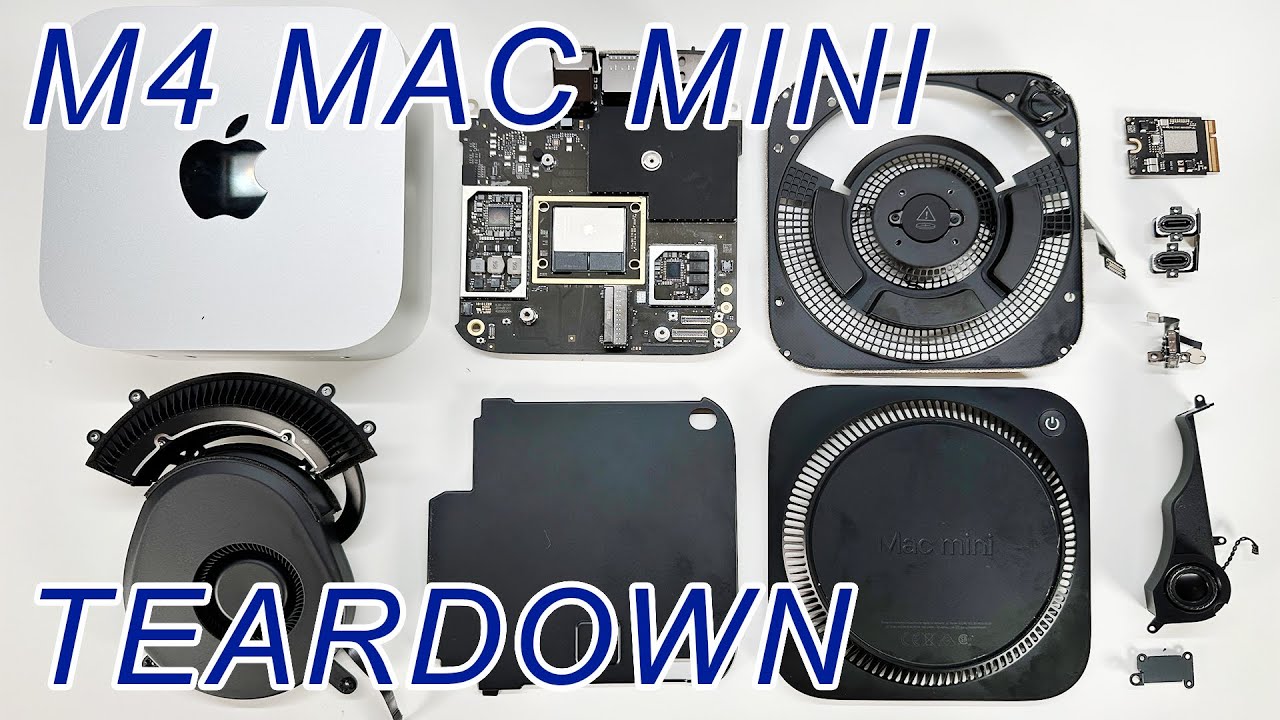
Teardown on the smallest Mac ever! The 2024 Mac Mini with M4 Chip. The ultra-small form factor makes tearing down this device an absolute mess!Since people a...
No one in their right mind would pay Apple for that much internal storage. It’s way cheaper to attach an external SSD which these days are amazingly fast. Even in its base configuration it’s an extremely powerful piece of kit.
I got an AI to write this limerick - I have no idea if it reeved this from somewhere:
There once was a budget by Reeves,
Which pensioners met with unease.
With taxes sky-high,
And benefits dry,
They felt they’d been brought to their knees.
Should have got the Christmas money for the first time this year. Like most I suspect on here didn't actually need it. I was going to give it to Crisis to help those genuinely in need of a bit of warmth. After all despite what some say I hadn't really "paid in all my life for it"
I think I'd struggle with the 256Gb limit for the system drive of the base M4 Mini. Depending on what you install applications can take at least half of that, I'd definitely want an external thunderbolt SSD from the go.
The daft thing is if you take the base Mac Mini M4 and bump each of the memory and SSD up one level to 24Gb memory / 512Gb SDD it's £999 so you've almost paid for another base spec M4 Mac Mini. Apple are raking it on spec upgrades.
If you have money to spend you might as well get the Mini M4 Pro base level for £999 which is 24Gb memory and 512Gb SSD.
If I got the M4 Pro version though I'd bump up the SSD to 1Tb for the longevity - my Macbook Pro laptop is 1Tb and it's over half full. I know, I need to do a clear out...but the headroom is useful. I've found that using a laptop actually on your lap in a comfy chair is a pain with external drives plugged in as sometimes you can accidentally pull the cable and it disconnects. Maybe not such a problem with a desk system.
Back in 2019, my old 2012 iMac stopped taking operating system upgrades. Not long afterwards it also stopped taking upgrades to some of the photo processing packages that I was using at that time. It was time for a replacement. My old iMac was still in perfect condition and it irritated me that that great monitor was going to waste. So I looked very carefully at a Mac Mini.......
I looked at my storage and processor requirements and decided to order a Mac Mini with a 3.2 GHz 6-Core Intel Core i7 processor, 64 GB RAM and a 2 TB internal SSD. The 2 TB SSD should have been sufficient for most of my general processing needs, with an existing 4 TB external drive for all of my photographic and video needs. I had already bought the 4 TB external drive when my iMac's 2 TB internal drive had started getting close to full.
Even though it was late 2019 when I ordered the Mac Mini, what i received was a 2018 model Mac Mini. I immediately discovered that the internal GPU (Graphics Processing Unit) of the Intel based Mac Mini was not up to the standard required for high volume photograph processing. So I bought a Black Magic eGPU (external Graphics Processing Unit) which I plugged into one of the Thunderbolt 4 (USB-C) ports at the back of the Mac Mini. All was then fine and continued to be fine, until the 4 TB external drive started getting a bit full. I then bought a LaCie 28TB external HDD, which was actually 2x13 TB hard drives, which I mirrored and transferred the old 4 TB drive to the back of the old iMac for emergency use.
So there's the history of my Mac Mini and its drives.......
A few weeks ago I decided to upgrade the OS on all of my Macs to Sequoia 15.1. All went fine with my Apple Silicon (M2 Max) MacBook Pro, but after about 12 hours of updating the Mac Mini, I finally lost patience and decided to cold reboot the Mac Mini and try again. That didn't work. - I just got a big white Apple sign in the middle of the screen, but it went no further. After a further 24 hours, I again lost patience and, as the Max Mini was still under the AppleCare+ package, I took it into the local Genius Bar and asked for help. After a few attempts, they admitted defeat and said that they would have to totally wipe the SSD and reload everything from scratch. Did I have a backup? Yes, I had a current Time Machine Backup. They then called my up the following day and said to come and collect my Mac Mini. It took the better part of a day to restore everything from the Time Machine Backup, but at least I was able to do that at home.
I took this episode as a bit of a warning that it wouldn't be too long before I had to upgrade the Mac Mini. What would my requirements be? First check to see how much disc space I was using:
I was surprised to see that the 2 TB internal SSD was nearly half full. Sure I could cut back on a few things but, as I would be buying for the future, I could see that a 1 TB SSD wouldn't be sufficient. It would have to be at least 2 TB. As for the external drive, there is lots of space still available and it can easily be upgraded / replaced. For RAM (now called "Unified Memory" in the Apple Silicon Macs), it was a bit confusing. Clearly the 64 GB RAM in the current Mac Mini was way over the top. But I would still be a bit wary of opting for the minimum. If I were to upgrade the Mac Mini at this moment, I would probably opt for the M4 Max with 48 GB unified memory and an internal 2 TB SSD, which is now avail at quite a bit cheaper price than the old Mac Mini cost me 5 years ago. No need to buy an eGPU too!!
Larry Griffiths
Cameras: OM System OM-1, Olympus OM-D E-M1 Mk III, Olympus OM-D E-M1 | Flashes: Olympus FL-900R, Olympus FL-50R Lenses: Too many to list.
Has anybody got any further thoughts on which would be the best value specification for an M4 Mac Mini to run photo editing software? (Affinity Photo in my case.) The Pro is definitely a step too far for me but I am not sure whether 24 GB RAM and/or 512GB SSD is a worthwhile upgrade. Also any suggestions for a suitable external SSD hard drive?
The one thing that bothers me at the moment is I’m on a M1 chip set and it’s more than required for now ,but as time passes a upgrade to a M4 will be on the cards . But at the moment my M1 sits atop an accessory box the same size and shape which gives me the usb ports to the front . ( useful and often used) it also has an internal SSD hard drive . With the changing shape of the new Mac mini will I still be able to use that unit ?
Sounds good. Do you have any monitor you can plug into it for the initial setup? I’ve never tried the setup creating the user account etc over the Apple Remote screen connection. There could be a “boot strapping” problem with it to get screen sharing enabled on the Mini. If you have an LCD TV with an HDMI input + cable that might overcome any issues getting going with it. I use my old Intel Mac Mini over Apple Remote screen now from the laptop no problems but it’s already setup of course.
If you need more external storage I can recommend a 40Gbps Thunderbolt 4 NVME enclosure with an M2 SSD like I posted about here
In case it’s of interest to anyone seeking Mac external storage - I’ve just ordered another one of these and a 1Tb SSD. It’s £68 on Amazon with the %15 BF reduction
Inateck 40Gbps M.2 NVMe SSD Enclosure
https://www.amazon.co.uk/Inateck-Enclosure-Thunderbolt-Tool-Free-Installation/dp/B0CR3PY8YL
I already have another from a
We process personal data about users of our site, through the use of web browser cookies and other technologies, to deliver our services, and to analyse site activity. No banner advertising is shown to members logged in to the site. For additional details, refer to our Privacy Policy.
By clicking "I AGREE" below, you agree to our Privacy Policy and our personal data processing and cookie practices as described therein. You also acknowledge that this forum may be hosted outside your country and you consent to the collection, storage, and processing of your data in the country where this forum is hosted.

 Tweet
Tweet




Comment