
 Tweet
Tweet
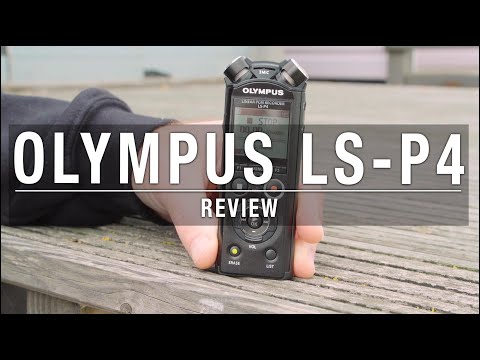
I decided to get an Olympus LS-P4 audio recorder to capture ambient audio for some projects creating short wildlife videos from clips when I go around nature reserves. I thought I would write up my findings in case anyone else is interested in trying this.
I had seen this setup at the Photography Show last year where someone on the Olympus stand demonstrated it to me and I have seen some Olympus videos online. They commonly show this recorder mounted on the hot shoe with a small hotshoe / tripod screw adaptor. One problem I saw with this is the recorder sticks out and impedes use of the EVF (it bangs on your head). I think the idea is to use the screen for video but I prefer the EVF when sitting in hides etc. So I got this Movo bracket shown in the photo below to solve that. This also allows to mount a pixel remote (shown in photo) for remote trigger of the camera (which I hope to use for some bank voles video recording with ambient sound). I also got an audio cable to plug the audio out from the recorder into the camera so the audio is also recorded alongside the video as well as on the LS-P4 (hopefully a better copy on the recorder). So the picture below shows my EM1MkII festooned with all this stuff. I don’t use the pixel remote when just walking around capturing video (“run and gun” is what I believe this is called..).
Findings so far;
- There is no way to start the audio at the same time as starting video on the camera. I either have to start the audio and leave it running or press the right buttons on each device which is fiddly. On this audio recorder you have to press record twice as the first press sets it to a paused mode to monitor sound levels first. I think this is a big oversight by Olympus. Their previous recorder LS-100 supported a USB connection.
- Mounting on the hot shoe means handling noises from the camera can come into the audio (button presses etc). This can be resolved with mounting on a tripod and using touch screen controls on the camera.
- Mounting on the hot shoe also captures low rumbling gyro noise from IS lenses like the 300 F4 into any ambient sound picked up (bird song etc). So it might be better to plant the audio device separately on a tripod. I went to a small village reserve the other day hoping to try this, there wasn’t a lot of birdsong but I got a lot of 300 F4 IS rumble! I need to do more investigation of this.
- The microphones on the device are OK but you are fighting signal to noise with low level ambient sounds or distant birdsong so then it is into buying expensive external mics. It might be fine for capturing a musical performance though.
- It is possible to remote trigger the LS-P4 with a BlueTooth connection to an Olympus Android app. So I can remote trigger it with my pixel remote for video and my phone for audio. There doesn’t seem to be an Apple/iOS app.
- If you have the audio connection to the camera, the in-camera video has the audio track which allows syncing up the audio from the recorder later in software. Packages like DaVinci Resolve seem pretty good at this.

I had seen this setup at the Photography Show last year where someone on the Olympus stand demonstrated it to me and I have seen some Olympus videos online. They commonly show this recorder mounted on the hot shoe with a small hotshoe / tripod screw adaptor. One problem I saw with this is the recorder sticks out and impedes use of the EVF (it bangs on your head). I think the idea is to use the screen for video but I prefer the EVF when sitting in hides etc. So I got this Movo bracket shown in the photo below to solve that. This also allows to mount a pixel remote (shown in photo) for remote trigger of the camera (which I hope to use for some bank voles video recording with ambient sound). I also got an audio cable to plug the audio out from the recorder into the camera so the audio is also recorded alongside the video as well as on the LS-P4 (hopefully a better copy on the recorder). So the picture below shows my EM1MkII festooned with all this stuff. I don’t use the pixel remote when just walking around capturing video (“run and gun” is what I believe this is called..).
Findings so far;
- There is no way to start the audio at the same time as starting video on the camera. I either have to start the audio and leave it running or press the right buttons on each device which is fiddly. On this audio recorder you have to press record twice as the first press sets it to a paused mode to monitor sound levels first. I think this is a big oversight by Olympus. Their previous recorder LS-100 supported a USB connection.
- Mounting on the hot shoe means handling noises from the camera can come into the audio (button presses etc). This can be resolved with mounting on a tripod and using touch screen controls on the camera.
- Mounting on the hot shoe also captures low rumbling gyro noise from IS lenses like the 300 F4 into any ambient sound picked up (bird song etc). So it might be better to plant the audio device separately on a tripod. I went to a small village reserve the other day hoping to try this, there wasn’t a lot of birdsong but I got a lot of 300 F4 IS rumble! I need to do more investigation of this.
- The microphones on the device are OK but you are fighting signal to noise with low level ambient sounds or distant birdsong so then it is into buying expensive external mics. It might be fine for capturing a musical performance though.
- It is possible to remote trigger the LS-P4 with a BlueTooth connection to an Olympus Android app. So I can remote trigger it with my pixel remote for video and my phone for audio. There doesn’t seem to be an Apple/iOS app.
- If you have the audio connection to the camera, the in-camera video has the audio track which allows syncing up the audio from the recorder later in software. Packages like DaVinci Resolve seem pretty good at this.


Comment